Operations
Stop Making Callers Wait
Reducing hold time isn’t just good service — it’s a competitive advantage your customers will notice.


Parallel Lambda Execution in Amazon Connect
High-volume contact centers face a mathematical reality: every second of sequential processing multiplied across thousands of daily calls creates hours of cumulative caller wait time. Every backend health check, fraud detection scan, or data validation that your contact flows perform adds precious seconds to call handling time. When these operations run sequentially—waiting for one Lambda function to complete before starting the next—callers sit in silence or listen to hold music while your systems churn through essential but time-consuming processes. At scale, those extra seconds translate to abandoned calls, frustrated customers, and significantly higher operational costs. System degradation events can introduce delays of up to 8 seconds, creating particularly poor caller experiences.
Amazon Connect’s new parallel Lambda execution capability changes this equation entirely. Instead of forcing callers to wait through sequential operations, you can now trigger multiple Lambda functions simultaneously in the background while callers hear welcome messages and prompts. This architectural shift transforms unavoidable processing time into productive caller engagement time. The result is faster call resolution, improved customer satisfaction scores, and measurable cost savings—especially critical for high-volume contact centers where every second of reduced call time multiplies across thousands of interactions daily.
The Technical Implementation
Amazon Connect introduced parallel Lambda support on July 9, 2025, but their announcement lacked implementation details. The pattern requires four specific Contact Flow blocks working in sequence:
- Invoke Lambda (Async Mode) Set your Lambda function to asynchronous execution. This triggers the function without waiting for a response.
- Set Flow Attribute: LambdaInvocationId Store the unique invocation ID that Connect generates. This becomes your reference for retrieving results later.
- Wait for Lambda When your flow logic needs the Lambda results, use this block with the stored invocation ID to pause until completion.
- Load Lambda Results Retrieve the actual Lambda response data using the invocation ID.
The key insight is timing your invocations strategically. Start with Lambda functions you’ll need soonest, then trigger longer-running processes, allowing maximum overlap with caller-facing activities.
Real-World Scenario: Optimized Call Flow
Consider a contact center that performs three critical operations: loading dynamic prompts, checking backend system health, and running fraud detection. The traditional sequential approach creates a poor caller experience:
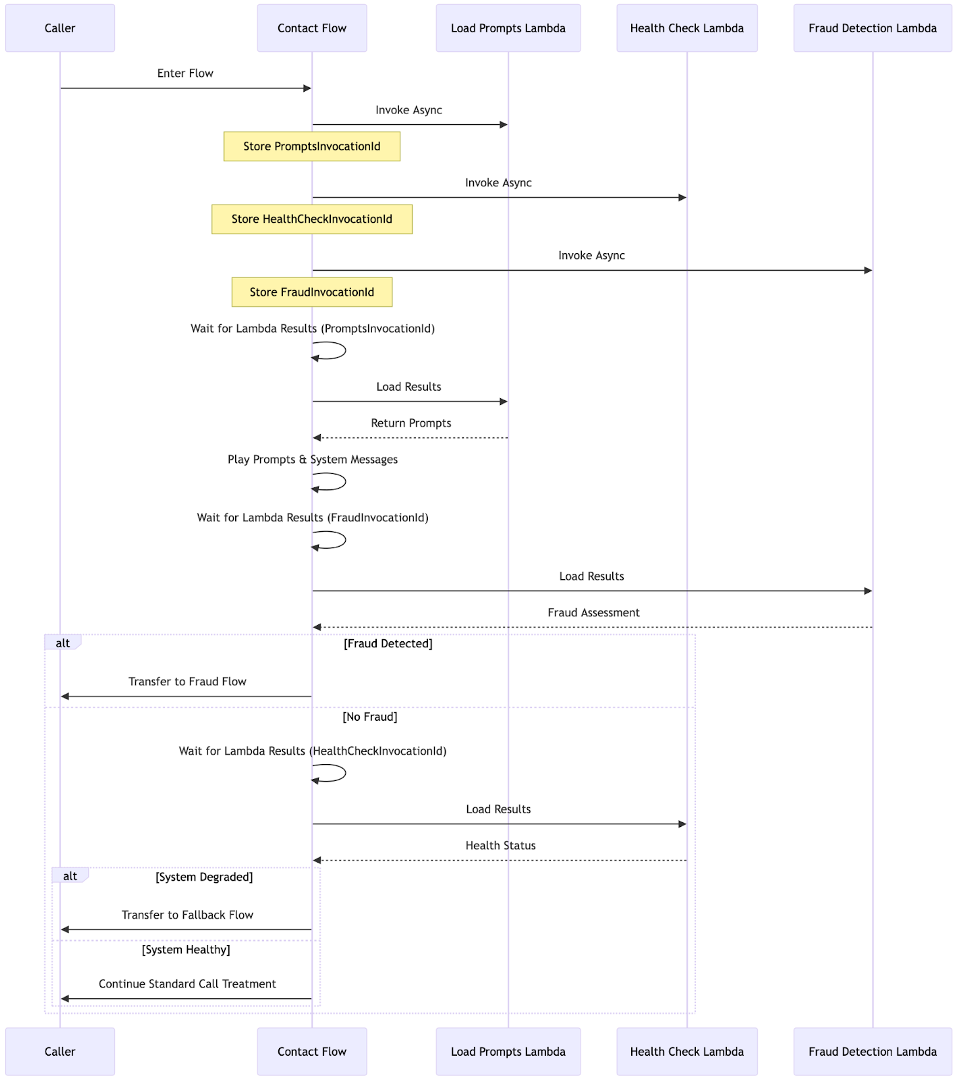
Optimized Execution Order:
- Invoke Load Prompts Lambda – Start this first since you’ll need prompts immediately
- Invoke Health Check Lambda – Trigger this early as it has the longest execution time (potentially 8+ seconds during degradation)
- Invoke Fraud Detection Lambda – Start fraud scanning in parallel
- Wait for prompts, play them to caller – Caller hears content while background processing continues
- Check fraud results – Make routing decisions based on fraud assessment
- Check health results – Route to fallback systems if degradation detected
- Continue with standard call treatment
This pattern eliminates caller wait time entirely when system/welcome prompts take longer than the parallel execution time. Instead of experiencing 2-8 seconds of dead air or hold music while Lambda functions execute sequentially, callers hear content immediately while background processing completes. The optimal outcome is zero perceived latency—callers never know the system is performing complex operations behind the scenes.
Business Impact and ROI
The operational benefits compound quickly at scale. A contact center handling 10,000 calls daily with an average 8-second latency reduction sees dramatic improvements:
- Reduced call duration: 22+ hours saved daily across all calls
- Cost savings: Lower telecom charges and agent idle time
- Capacity gains: Faster call resolution increases hourly call handling capacity
- Customer satisfaction: Improved NPS scores from reduced wait times
- Competitive advantage: Callers notice and remember responsive systems
For enterprise contact centers, these improvements often justify the development investment within weeks of implementation.
Implementation Best Practices
For Contact Center Managers:
- Audit current Lambda execution patterns in your flows
- Identify operations that can run in background during prompt playback
- Prioritize high-volume flows for parallel implementation
- Monitor call duration metrics before and after implementation
For Developers:
- Always invoke Lambdas in order of when you’ll need results
- Start longest-running functions first
- Store invocation IDs immediately after each async invoke
- Design fallback logic for Lambda timeouts or failures
- Test thoroughly with realistic load and latency conditions
In summary, parallel Lambda execution transforms Amazon Connect from a sequential processing system into a truly responsive contact center platform. By overlapping necessary backend operations with caller engagement, you eliminate the traditional trade-off between system reliability and customer experience. The implementation requires careful planning and technical precision, but the operational benefits—reduced costs, improved satisfaction, and competitive advantage—make it essential for any serious contact center operation.
Next Steps
Start by mapping your current Lambda usage in high-volume contact flows. Identify which functions can run asynchronously and estimate potential time savings. Then implement a pilot with one flow, measure the results, and scale the pattern across your contact center infrastructure. The sooner you implement parallel execution, the sooner you’ll see measurable improvements in both customer experience and operational efficiency.